WordPress Speed Optimization Service
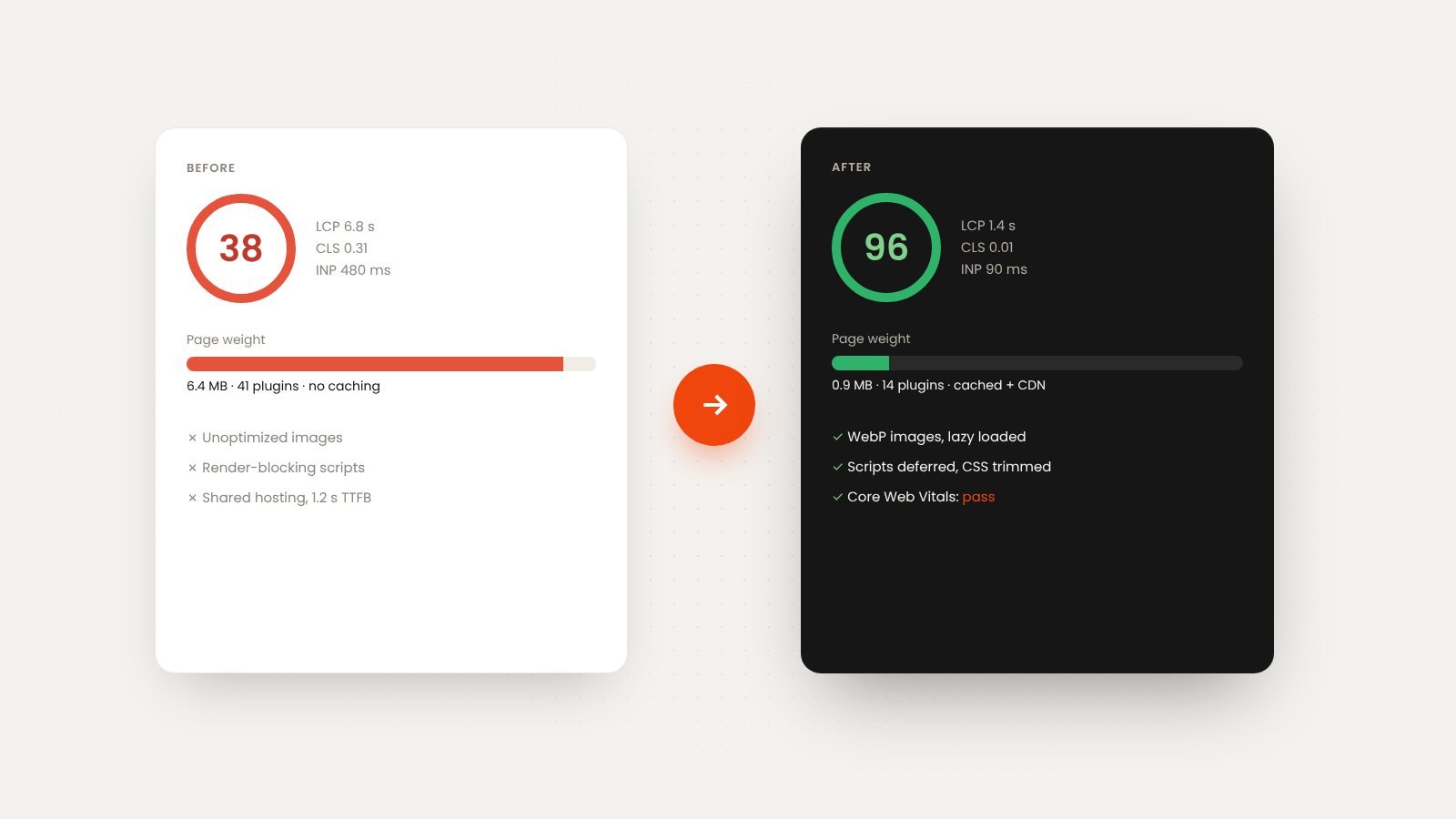
OutcomeBuilt's WordPress speed optimization service makes slow WordPress sites fast on mobile and desktop and helps them pass Google's Core Web Vitals. We fix the real causes, such as heavy themes, too many plugins, unoptimized images, render-blocking code and weak hosting, and we show the PageSpeed Insights scores before and after.
Built around your budgetWe shape the first phase to fit what you have, with a fixed written quote before work starts.

A slow website loses visitors before they read a word, and Google notices.
Most slow WordPress sites are not slow because of WordPress. They are slow because of what was added to them.
Red Core Web Vitals in Search Console
Poor LCP, CLS or INP scores hold back rankings and show up as failures in Google's reports.
Plugin pile-up
Thirty plugins loading scripts on every page, several doing the same job.
Huge images and videos
Full-size photos straight from a camera, served to phones over mobile data.
Cheap hosting
Shared servers with slow response times no amount of caching can hide.
A measurably faster site, without a redesign.
- Baseline measurement: PageSpeed Insights, Core Web Vitals and Search Console data
- Plugin audit: remove, replace or defer what is not needed
- Image optimization: WebP/AVIF, correct sizes, lazy loading
- Caching, CDN and database cleanup
- Render-blocking CSS and JavaScript fixed; fonts optimized
- Hosting review and migration if the server is the bottleneck
What changes when you work with OutcomeBuilt
Green Core Web Vitals
LCP, CLS and INP within Google's thresholds, verified in Search Console over the following weeks.
Faster on real phones
Pages that load in a couple of seconds on mobile data, where most visitors are.
Fewer plugins, fewer problems
A leaner site is also more secure and easier to maintain.
Proof in numbers
A before-and-after report with scores, load times and page weight.
WordPress Speed Optimization services we provide
Core Web Vitals fixes
Targeted work on Largest Contentful Paint, Cumulative Layout Shift and Interaction to Next Paint.
Image and media optimization
Conversion to modern formats, resizing, lazy loading and video compression.
Plugin and theme audit
Finding the plugins and theme features that cost the most and replacing or removing them.
Caching, CDN and hosting
Page and object caching, CDN setup and a hosting recommendation or migration.
Website maintenance plans→Code-level optimization
Deferring scripts, trimming CSS, fixing render-blocking resources and font loading.
WooCommerce speed
Cart, checkout and product page performance for stores.
From problem to working solution
No technical brief needed. Bring the business problem; shaping the right solution is our job.
[01]
Measure
Lab and field data for the key pages, with the causes ranked by impact.

[02]
Fix on staging
Changes made on a copy of the site and tested page by page.

[03]
Deploy and verify
Live deployment, then re-measurement and a before-and-after report.

[04]
Keep it fast
Guidance for your team, or a maintenance plan that keeps speed from decaying.

What WordPress speed optimization costs
Most sites are a fixed-price project of a few days; stores and very large sites take longer. We work with a range of budgets. Tell us what you have to work with and we shape a first phase that fits it, with a fixed written quote before any work starts.
Current state
A site with a heavy page builder and forty plugins takes more work than a lean one.
Number of templates
Home, service, blog and shop templates each need attention.
WooCommerce
Stores add dynamic pages that cannot be fully cached.
Hosting changes
A migration adds setup and DNS work but often gives the biggest gain.
Media volume
Thousands of images take longer to convert and resize.
Industries we build wordpress speed optimization for
Small business and professional services
Lead-generation sites where speed affects inquiries.
Associations and nonprofits
Content-heavy sites with events and members.
E-commerce
WooCommerce stores where speed affects sales.
Publishers and blogs
Ad-heavy and media-heavy pages.
Healthcare
Practice sites visited on mobile.
Agencies
White-label speed work for client sites.
How to choose a WordPress speed optimization service
Whether you choose us or someone else, these are the questions worth asking before you sign.
Ask for before-and-after reports
Real PageSpeed and Core Web Vitals numbers from past projects, not promises.
Ask what they will remove
Speed usually comes from removing things. A provider who only adds caching plugins is not fixing causes.
Check they work on staging
Speed changes can break layouts; they should be tested before going live.
Ask about field data
Lab scores are not the same as real-user Core Web Vitals in Search Console. Both should improve.
Ask how it stays fast
Without maintenance, sites slow down again within months.
Still have a question?
Share the problem and we will come back with a clear direction.
WordPress Speed Optimization: common questions
The usual causes are heavy themes and page builders, too many plugins loading on every page, unoptimized images, render-blocking scripts and styles, no caching, and slow shared hosting. A speed audit ranks which ones matter on your site.
Google's three page-experience metrics: Largest Contentful Paint (loading), Cumulative Layout Shift (visual stability) and Interaction to Next Paint (responsiveness). Passing them helps rankings and conversions, and Search Console reports them from real visitors.
No. We optimize what loads and how, not the design. Any visual change is agreed first.
Not always. If server response time is the bottleneck, we recommend a move and handle the migration; otherwise we optimize on your current host.
It depends on the starting point. Most sites we optimize move from failing to passing Core Web Vitals and cut page weight substantially. We report exact before-and-after numbers.
Yes. Product, cart and checkout pages need specific work because they cannot be fully cached; we handle that.
They last as long as nothing heavy is added back. We provide guidance, or a maintenance plan that keeps speed monitored.
Most sites take a few days to a week, including staging tests and verification.
It depends on the site's current state, the number of templates and whether hosting needs to change. We work with a range of budgets: tell us what you have to work with and we will focus on the fixes with the biggest gain. After a short call about the problem, we send a written proposal with a fixed scope, timeline and price before any work starts, so you know the full cost up front.
Often part of the same project
Have a problem like this?
Share it in plain language, or book a free 30-minute call. We'll come back with a clear direction.